


The Problem
Helix runs AI coding agents inside isolated desktop containers — each agent gets its own GNOME desktop with a full IDE, Docker daemon, and development environment. When an agent needs to build a project, it runs docker build inside its container.
The problem: every new agent session started with a cold Docker build cache. The containers are ephemeral — when a session ends, the container is destroyed along with its Docker state. For a project like Helix itself (which compiles a Rust IDE, Go APIs, Python services, and a Node.js frontend), a cold build takes 43 minutes. That’s 43 minutes of an agent sitting there waiting for builds before it can start working.
This matters because multiple agents regularly clone the exact same source code. Ten agents working on ten different tasks in the same repo all need to build the same base images. Without shared caching, that’s 10 * 43 minutes = 7 hours of redundant compilation.
The Architecture
The container nesting looks like this:
Host Machine
└── sandbox-nvidia (Docker-in-Docker host)
    ├── helix-buildkit (shared BuildKit instance)
    │   └── buildkit_state volume (persistent cache)
    ├── helix-registry (shared Docker registry)
    │   └── registry_data volume (layer-level transfer cache)
    ├── agent-session-A (desktop container)
    │   └── local dockerd → builds route to shared BuildKit
    ├── agent-session-B (desktop container)
    │   └── local dockerd → builds route to shared BuildKit
    └── agent-session-C ...
Each desktop container runs its own Docker daemon (for isolation), but all builds route to a shared BuildKit instance at the sandbox level. The BuildKit cache is stored on a persistent Docker volume that survives container restarts.
The key insight: when Agent B builds the same Dockerfile that Agent A already built, BuildKit says “I already have all these layers cached” and the build completes instantly. The cache is content-addressed — identical inputs produce identical cache keys regardless of which container initiated the build.
The --load Bottleneck
Shared BuildKit got us halfway there. Builds were fast (~0.5 seconds for fully cached images), but there was a catch: the image still needed to be loaded into the local Docker daemon.
When using a remote BuildKit builder, docker buildx build --load exports the built image as a tarball, streams it over gRPC to the client, and imports it into the local daemon. This happens even when every layer is cached and the image hasn’t changed at all.
For a 7.73GB image (our desktop base image with GNOME, IDE, and dev tools):

That’s 10 seconds to transfer an image that didn’t change. The --load flag serializes the entire image into a Docker-format tarball, streams it over gRPC, and the receiving daemon deserializes and imports every layer — even layers it already has. There’s no layer-level deduplication in the tarball transfer path.
This adds up: building Helix involves 6+ images. Even with a hot BuildKit cache, the --load overhead per image turns a sub-second build into a 10-second wait, and the full stack build takes ~23 seconds of mostly --load transfers.
Smart --load
The first optimization: don’t load the image if it hasn’t changed.
docker build -t myapp:latest .
  └── wrapper intercepts
      1. Build with --output type=image --provenance=false --iidfile /tmp/iid
         → BuildKit resolves all layers (cached: ~0.5s)
         → Writes image config digest to iidfile
         → No tarball transfer (--output type=image stores in BuildKit only)
      2. Compare iidfile digest with local daemon's image ID
         → docker images --no-trunc -q myapp:latest
      3. Match? → Skip --load. "Image unchanged, skipping load"
         Differ? → Use registry push/pull for layer-level transfer
A transparent wrapper at /usr/local/bin/docker intercepts both docker build and docker buildx build, applying this logic automatically. No code changes needed in build scripts, Makefiles, or CI pipelines.
Three Critical Details
1. --iidfile is empty without an output mode on remote builders.
docker buildx build --iidfile /tmp/iid -t foo . with a remote builder produces an empty iidfile. BuildKit doesn’t compute the image config digest unless it actually exports something. The fix: --output type=image tells BuildKit to create the manifest in its internal store (instant for cached builds, no data transfer) and populates the iidfile.
2. --provenance=false is required.
With default provenance, BuildKit wraps the image manifest in a manifest list that includes an attestation document with build timestamps. The iidfile gets the manifest list digest, which changes every build (because the timestamp changes). With --provenance=false, the iidfile contains the bare image config digest — deterministic and matching what docker images --no-trunc -q returns.
3. The wrapper must handle both docker build and docker buildx build.
Docker 29.x’s docker build ignores the default buildx builder entirely — it always uses the local daemon’s built-in BuildKit. Only docker buildx build honors the configured builder. The wrapper rewrites docker build to docker buildx build (to use the shared cache) and applies smart --load (to avoid the tarball transfer).
Registry-Accelerated Loading
Smart --load eliminates the transfer when nothing changed. But when code does change, even a one-line change in the top layer of a 7.73GB image still triggers a full tarball --load (~10s). The tarball format doesn’t support layer-level deduplication — it’s all or nothing.
We solved this with a shared Docker registry running alongside BuildKit on the sandbox network. When the wrapper detects an image has changed, instead of --load:
Push to the registry — BuildKit pushes only the changed layers (~0.1s)
Pull from the registry — the local daemon checks which layers it already has, downloads only the new ones (~0.5s)
The Docker registry protocol does layer-level dedup natively. For a 7.73GB image with 95 base layers and 1 changed layer, the pull shows 95 “Already exists” and downloads only the single new layer.
Benchmarks: 1-line change in top layer of 7.73GB image
Measured E2E inside a real desktop container, 3 runs each:

The three paths compose naturally:
Image unchanged → skip load entirely (314ms)
Image changed, registry available → push/pull via registry (871ms)
Image changed, no registry → fall back to tarball
--load(10s)
Results
There are two cases that matter: cold start (first agent to build a project) and warm start (subsequent agents building the same source).
Cold start: ~10 minutes (down from 45 minutes)
A fresh agent session starts with an empty Docker daemon — no images, no layers. Even though every build is a cache hit in shared BuildKit (the compilation is instant), the images still need to be transferred into the local daemon. For Helix-in-Helix, this is a deeply nested pipeline:
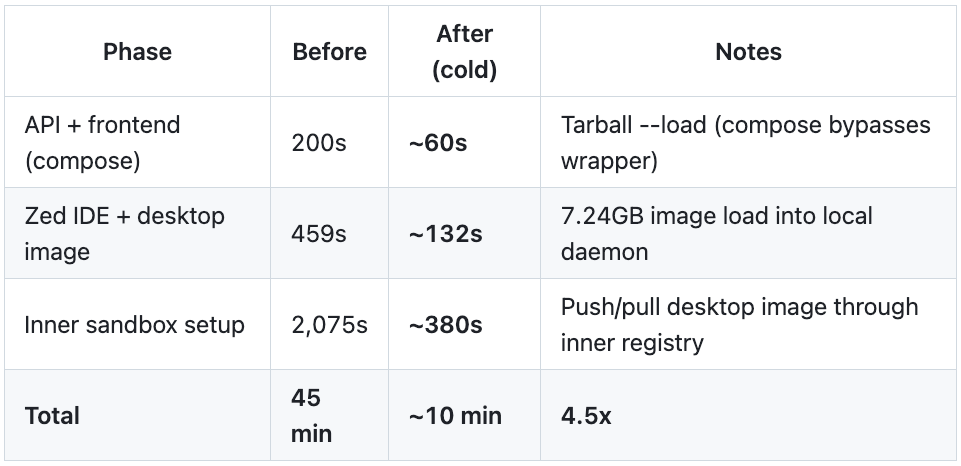
The cold start is dominated by image transfer, not compilation. BuildKit resolves all layers instantly (cached), but loading 7+ GB images into each nesting level takes time. The bottleneck is the --load tarball path: it serializes the entire image regardless of what the receiving daemon already has.
The nesting makes this worse: Helix-in-Helix has the desktop container (L2) building an inner sandbox (L3), which needs the same 7.24GB desktop image transferred again to a fresh daemon one level deeper.
Warm start: 23 seconds (124x faster)
Once images exist in the local daemon, subsequent builds are near-instant:
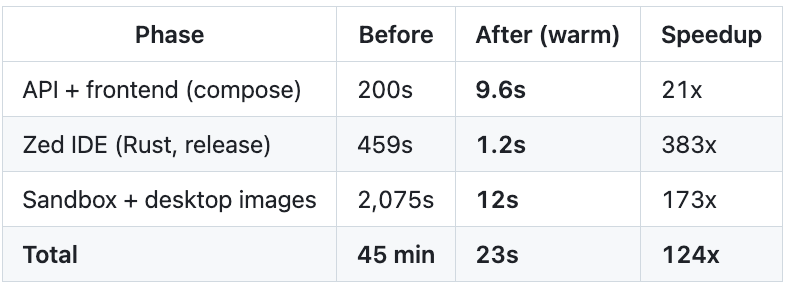
Smart --load checks the image digest against the local daemon (~0.3s) and skips the transfer when nothing changed. This is the common case: agents working on the same codebase where the base images haven’t been modified.
Incremental changes: ~1 second per image
When code actually changes, the registry-accelerated load transfers only the changed layers:

A one-line Go change rebuilds only the final compilation layer (~30s) and transfers only that layer via the registry (~1s) instead of the entire 43-minute pipeline.
Compose Build Interception
There was a gap in the smart --load optimization: docker compose build bypassed it entirely.
Docker Compose invokes BuildKit through its own Go API, not through the CLI. Our wrapper intercepts docker build and docker buildx build, but compose calls buildx bake internally — so smart --load never fires. Every compose build did a full tarball --load, even for unchanged images.
The fix: the wrapper now intercepts docker compose ... build, parses the compose config to extract each service’s build definition, and builds them individually through the existing smart --load path:
docker compose -f docker-compose.dev.yaml build
  └── wrapper intercepts (compose + build detected)
      1. $REAL_DOCKER compose config --format json
         → extract services, image names, build contexts, Dockerfiles, args
      2. For each service with a build section:
         → docker buildx build -t $IMAGE -f $DOCKERFILE $CONTEXT
         → smart --load: skip if unchanged, registry push/pull if changed
      3. Compose up finds the images locally.
Results:

Not as dramatic as the other optimizations, but 6 seconds saved on every warm build adds up across thousands of agent sessions.
The Golden Docker Cache: Eliminating Cold Start Entirely
Smart --load, registry-accelerated transfers, and compose interception transformed warm starts from 45 minutes to 23 seconds. But the cold start — the first agent session for a project — still took 10 minutes. Every image had to be transferred into an empty Docker daemon, even though BuildKit compiled nothing.
We wanted cold start to feel like warm start. Zero penalty for being the first session.
The idea
When code merges to main, automatically spin up a desktop container, run the project’s startup script (which builds all the Docker images), then snapshot the entire /var/lib/docker directory. When a new session starts, copy that snapshot — the “golden cache” — into the session’s Docker data directory. The local daemon starts with all images pre-populated. No builds, no transfers, no waiting.
Why it captures everything
Docker’s data directory contains everything the daemon needs:
Image layers (
overlay2/) — all built images, all layersDocker volumes (
volumes/) — inner registries, BuildKit state, nested Docker dataContainer metadata — not useful (containers don’t survive restart), but harmless
For a project like Helix-in-Helix, the golden cache even includes the inner sandbox’s Docker data (stored as a Docker volume within the session’s daemon). The inner sandbox starts with its images pre-populated too — no transfer through the inner registry needed.
The build is just a startup script run
Golden builds are beautifully simple: they’re regular desktop containers with one special environment variable (HELIX_GOLDEN_BUILD=true). The container clones the repo, checks out main, runs the startup script, then exits. The workspace setup script detects the golden mode and skips launching the IDE — just runs the startup script in the foreground and exits with its return code.
No new build system. No image manifest parsing. No layer-level copying. The startup script already knows how to build the project. We just run it once and keep the result.
Per-project, automatic, incremental
Each project gets its own golden cache, scoped by project ID:
/container-docker/
├── golden/
│   ├── prj_abc123/docker/    ← Project A's golden (8.7 GB)
│   └── prj_def456/docker/    ← Project B's golden (3.2 GB)
└── sessions/
    └── docker-data-ses_xyz/docker/  ← copied from golden at session start
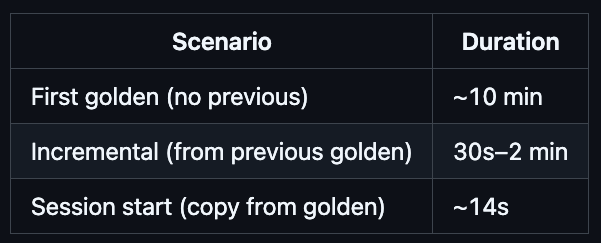
Golden builds trigger automatically when code merges to main (via PR merge or internal approve-implementation). They’re debounced per-project — if a build is already running, additional merges are skipped. And critically, they’re incremental: each golden build starts from the previous golden cache, so only changed images need rebuilding. A typical incremental golden build takes 30 seconds to 2 minutes, not 10 minutes.
The overlayfs false start
Our first approach was elegant on paper: use overlayfs with the golden as the read-only lower directory and a per-session upper directory for copy-on-write. O(1) mount time, true COW semantics, minimal disk usage.
It didn’t work. Docker’s overlay2 storage driver creates its own overlayfs mounts inside /var/lib/docker/overlay2/. Nested overlayfs requires the upper directory to be on a non-overlayfs filesystem — our merged directory was itself overlayfs, so Docker failed with invalid argument. This is a kernel-level restriction, not a configuration issue.
The copy approach that actually works
We switched to cp -a: copy the entire golden directory to the session’s Docker data directory at session start. Less elegant than overlayfs, but it works reliably and performs well enough:
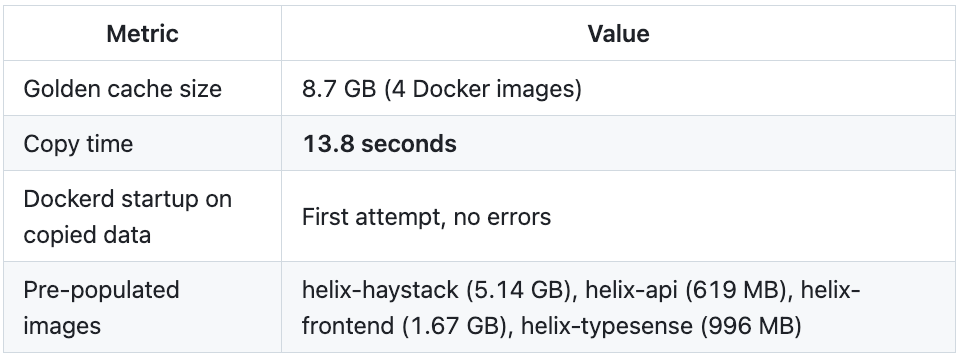
13.8 seconds to go from empty daemon to 8.7 GB of pre-built images. Compare that to 10 minutes of building and transferring through nested daemons.
Staleness is handled gracefully
What if code changes after the golden was built? The session starts with slightly stale images, but the smart --load optimization handles it transparently. When the startup script runs docker build, the wrapper checks the image digest against BuildKit — if it’s changed, the registry push/pull transfers only the changed layers (~1 second). The golden provides a warm baseline; the wrapper handles the delta.
The golden rebuilds on the next merge to main, so staleness is bounded by the development cycle.
The Full Picture
Here’s where we ended up, starting from 45 minutes:
Cold start: 14 seconds (from 10 minutes, from 45 minutes)
PhaseOriginalSmart --loadGolden cacheAPI + frontend (compose)200s41s0s (pre-built)Zed IDE + desktop image459s132s0s (pre-built)Inner sandbox setup2,075s380s0s (pre-built)Golden copy——14sTotal45 min10 min14sSpeedupbaseline4.5x193x
Warm start: 23 seconds (unchanged)
The warm start didn’t change — it was already fast from smart --load. The golden cache’s value is making cold start match warm start.
Incremental golden builds: 30s–2 min
Golden builds start from the previous golden, so they only rebuild what changed:
Implementation
The system has four components working together:
Docker wrapper — installed at
/usr/local/bin/dockerin each desktop container. Interceptsdocker build,docker buildx build, anddocker compose build. Routes builds through shared BuildKit, applies smart--loadwith registry acceleration, decomposes compose builds into individual smart builds. Falls back to tarball--loadif the registry is unavailable.Shared BuildKit + Registry (
api/pkg/hydra/manager.go) — Hydra starts ahelix-buildkitcontainer (shared build cache) and ahelix-registrycontainer (layer-level transfer) at the sandbox level. Both are on the same Docker network as desktop containers. BuildKit is configured to trust the insecure registry for push operations.Init script (
desktop/shared/17-start-dockerd.sh) — configures the desktop container’s dockerd to trust the insecure registry and exportsHELIX_REGISTRYandBUILDX_BUILDERglobally so the wrapper knows where to push/pull and which builder to use.Golden build service (
api/pkg/services/golden_build_service.go,api/pkg/hydra/golden.go) — manages golden cache lifecycle. The API-side service triggers builds on merge-to-main, tracks build status in project metadata, and debounces concurrent builds. The Hydra-side code handles golden directory management, session-to-golden promotion, and thecp -acopy on session startup.
The wrapper is generic — it works for any docker build workload, not just Helix. It auto-detects whether the active builder is remote, and only applies smart --load when it is. On a standard local Docker setup, it’s a transparent passthrough.
What We Built
We started with a simple problem — Docker builds are slow when every agent starts cold — and ended up building something genuinely interesting: a multi-layered caching system that operates transparently across nested Docker daemons, shared build caches, and per-project golden snapshots.
The numbers tell the story:
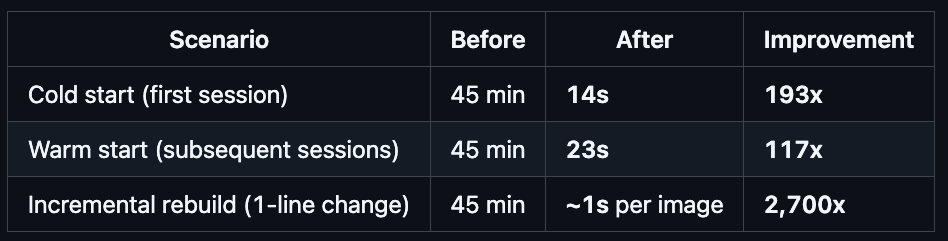
An agent can now start working on a project in under 30 seconds, regardless of whether it’s the first session or the hundredth. The difference between 45 minutes and 14 seconds isn’t incremental — it changes what’s practical. Agents can spin up, do focused work, and tear down without the overhead dominating the task. Short-lived sessions become viable. Parallel agents become economical.
And the best part: it’s all transparent. Build scripts, Makefiles, docker-compose files — none of them changed. The wrapper intercepts standard Docker commands and applies the optimizations automatically. Projects opt into golden cache warming with a single toggle, and the system handles the rest.