

Part 2 of our video streaming saga. Read Part 1: How we replaced WebRTC with WebSockets →
The Year is 2025 and We’re Sending JPEGs
Let me tell you about the time we spent three months building a gorgeous, hardware-accelerated, WebCodecs-powered, 60fps H.264 streaming pipeline over WebSockets...
...and then replaced it with grim | curl when the WiFi got a bit sketchy.
I wish I was joking.
Act I: Hubris (Also Known As “Enterprise Networking Exists”)
We’re building Helix, an AI platform where autonomous coding agents work in cloud sandboxes. Users need to watch their AI assistants work. Think “screen share, but the thing being shared is a robot writing code.”
Last week, we explained how we replaced WebRTC with a custom WebSocket streaming pipeline. This week: why that wasn’t enough.
The constraint that ruined everything: It has to work on enterprise networks.
You know what enterprise networks love? HTTP. HTTPS. Port 443. That’s it. That’s the list.
You know what enterprise networks hate?
UDP — Blocked. Deprioritized. Dropped. “Security risk.”
WebRTC — Requires TURN servers, which requires UDP, which is blocked
Custom ports — Firewall says no
STUN/ICE — NAT traversal? In my corporate network? Absolutely not
Literally anything fun — Denied by policy
We tried WebRTC first. Worked great in dev. Worked great in our cloud. Deployed to an enterprise customer.
“The video doesn’t connect.”
checks network — Outbound UDP blocked. TURN server unreachable. ICE negotiation failing.
We could fight this. Set up TURN servers. Configure enterprise proxies. Work with IT departments.
Or we could accept reality: Everything must go through HTTPS on port 443.
So we built a pure WebSocket video pipeline:
H.264 encoding via GStreamer + VA-API (hardware acceleration, baby)
Binary frames over WebSocket (L7 only, works through any proxy)
WebCodecs API for hardware decoding in the browser
60fps at 40Mbps with sub-100ms latency
We were so proud. We wrote Rust. We wrote TypeScript. We implemented our own binary protocol. We measured things in microseconds.
Then someone tried to use it from a coffee shop.
Act II: Denial
“The video is frozen.”
“Your WiFi is bad.”
“No, the video is definitely frozen. And now my keyboard isn’t working.”
checks the video
It’s showing what the AI was doing 30 seconds ago. And the delay is growing.
Turns out, 40Mbps video streams don’t appreciate 200ms+ network latency. Who knew.
When the network gets congested:
Frames buffer up in the TCP/WebSocket layer
They arrive in-order (thanks TCP!) but increasingly delayed
Video falls further and further behind real-time
You’re watching the AI type code from 45 seconds ago
By the time you see a bug, the AI has already committed it to main
Everything is terrible forever
“Just lower the bitrate,” you say. Great idea. Now it’s 10Mbps of blocky garbage that’s still 30 seconds behind.
Act III: Bargaining
We tried everything:
“What if we only send keyframes?”
This was our big brain moment. H.264 keyframes (IDR frames) are self-contained. No dependencies on previous frames. Just drop all the P-frames on the server side, send only keyframes, get ~1fps of corruption-free video. Perfect for low-bandwidth fallback!
We added a keyframes_only flag. We modified the video decoder to check FrameType::Idr. We set GOP to 60 (one keyframe per second at 60fps). We tested.
We got exactly ONE frame.
One single, beautiful, 1080p IDR frame. Then silence. Forever.
[WebSocket] Keyframe received (frame 121), sending
[WebSocket] ...
[WebSocket] ...
[WebSocket] It's been 14 seconds why is nothing else coming
[WebSocket] Failed to send audio frame: Closed
checks Wolf logs — encoder still running
checks GStreamer pipeline — frames being produced
checks Moonlight protocol layer — nothing coming through
We’re using Wolf, an excellent open-source game streaming server (seriously, the documentation is great). But our WebSocket streaming layer sits on top of the Moonlight protocol, which is reverse-engineered from NVIDIA GameStream. Somewhere in that protocol stack, something decides that if you’re not consuming P-frames, you’re not ready for more frames. Period.
We poked around for an hour or two, but without diving deep into the Moonlight protocol internals, we weren’t going to fix this. The protocol wanted all its frames, or no frames at all.
“What if we implement proper congestion control?”
looks at TCP congestion control literature
closes tab
“What if we just... don’t have bad WiFi?”
stares at enterprise firewall that’s throttling everything
Act IV: Depression
One late night, while debugging why the stream was frozen again, I opened our screenshot debugging endpoint in a browser tab:
GET /api/v1/external-agents/abc123/screenshot?format=jpeg&quality=70The image loaded instantly.
A pristine, 150KB JPEG of the remote desktop. Crystal clear. No artifacts. No waiting for keyframes. No decoder state. Just... pixels.
I refreshed. Another instant image.
I mashed F5 like a degenerate. 5 FPS of perfect screenshots.
I looked at my beautiful WebCodecs pipeline. I looked at the JPEGs. I looked at the WebCodecs pipeline again.
No.
No, we are not doing this.
We are professionals. We implement proper video codecs. We don’t spam HTTP requests for individual frames like it’s 2009.
Act V: Acceptance
// Poll screenshots as fast as possible (capped at 10 FPS max)
const fetchScreenshot = async () => {
  const response = await fetch(`/api/v1/external-agents/${sessionId}/screenshot`)
  const blob = await response.blob()
  screenshotImg.src = URL.createObjectURL(blob)
  setTimeout(fetchScreenshot, 100) // yolo
}
We did it. We’re sending JPEGs.
And you know what? It works perfectly.
Why JPEGs Actually Slap
Here’s the thing about our fancy H.264 pipeline:
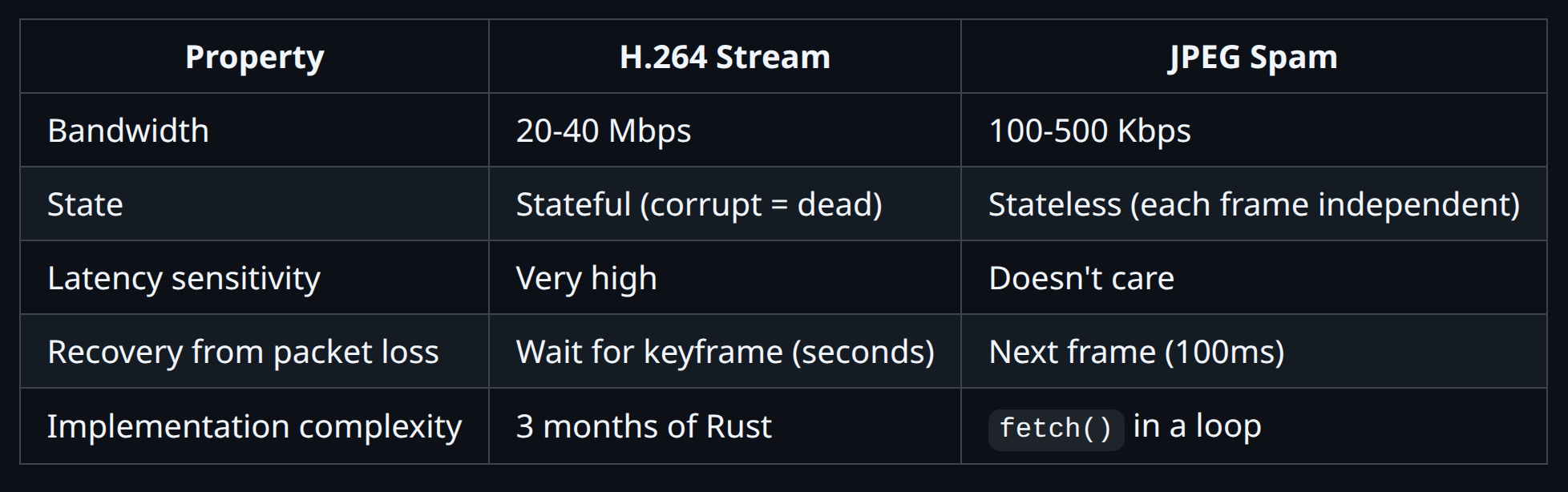
A JPEG screenshot is self-contained. It either arrives complete, or it doesn’t. There’s no “partial decode.” There’s no “waiting for the next keyframe.” There’s no “decoder state corruption.”
When the network is bad, you get... fewer JPEGs. That’s it. The ones that arrive are perfect.
And the size! A 70% quality JPEG of a 1080p desktop is like 100-150KB. A single H.264 keyframe is 200-500KB. We’re sending LESS data per frame AND getting better reliability.
The Hybrid: Have Your Cake and Eat It Too
We didn’t throw away the H.264 pipeline. We’re not complete animals.
Instead, we built adaptive switching:
Good connection (RTT < 150ms): Full 60fps H.264, hardware decoded, buttery smooth
Bad connection detected: Pause video, switch to screenshot polling
Connection recovers: User clicks to retry video
The key insight: we still need the WebSocket for input.
Keyboard and mouse events are tiny. Like, 10 bytes each. The WebSocket handles those perfectly even on a garbage connection. We just needed to stop sending the massive video frames.
So we added one control message:
json
{"set_video_enabled": false}Server receives this, stops sending video frames. Client polls screenshots instead. Input keeps flowing. Everyone’s happy.
15 lines of Rust. I am not joking.
rust
if !video_enabled.load(Ordering::Relaxed) {
    continue; // skip frame, it's screenshot time baby
}
The Oscillation Problem (Lol)
We almost shipped a hilarious bug.
When you stop sending video frames, the WebSocket becomes basically empty. Just tiny input events and occasional pings.
The latency drops dramatically.
Our adaptive mode sees low latency and thinks: “Oh nice! Connection recovered! Let’s switch back to video!”
Video resumes. 40Mbps floods the connection. Latency spikes. Mode switches to screenshots.
Latency drops. Mode switches to video.
Latency spikes. Mode switches to screenshots.
Forever. Every 2 seconds.
The fix was embarrassingly simple: once you fall back to screenshots, stay there until the user explicitly clicks to retry.
setAdaptiveLockedToScreenshots(true) // no oscillation for youWe show an amber icon and a message: “Video paused to save bandwidth. Click to retry.”
Problem solved. User is in control. No infinite loops.
Ubuntu Doesn’t Ship JPEG Support in grim Because Of Course It Doesn’t
$ grim -t jpeg screenshot.jpg
error: jpeg support disabled
Oh, you thought we were done? Cute.
grim is a Wayland screenshot tool. Perfect for our needs. Supports JPEG output for smaller files.
Except Ubuntu compiles it without libjpeg.
incredible
So now our Dockerfile has a build stage that compiles grim from source:
FROM ubuntu:25.04 AS grim-build
RUN apt-get install -y meson ninja-build libjpeg-turbo8-dev ...
RUN git clone https://git.sr.ht/~emersion/grim && \
    meson setup build -Djpeg=enabled && \
    ninja -C build
We’re building a screenshot tool from source so we can send JPEGs in 2025. This is fine.
The Final Architecture
┌─────────────────────────────────────────────────────────────┐
│                     User's Browser                          │
├─────────────────────────────────────────────────────────────┤
│  WebSocket (always connected)                               │
│  ├── Video frames (H.264) ──────────── when RTT < 150ms     │
│  ├── Input events (keyboard/mouse) ── always                │
│  └── Control messages ─────────────── {"set_video_enabled"} │
│                                                             │
│  HTTP (screenshot polling) ──────────── when RTT > 150ms    │
│  └── GET /screenshot?quality=70                             │
└─────────────────────────────────────────────────────────────┘
Good connection: 60fps H.264, hardware accelerated, beautiful
Bad connection: 2-10fps JPEGs, perfectly reliable, works everywhere
The screenshot quality adapts too:
Frame took >500ms? Drop quality by 10%
Frame took <300ms? Increase quality by 5%
Target: minimum 2 FPS, always
Lessons Learned
Simple solutions often beat complex ones. Three months of H.264 pipeline work. One 2am hacking session the night before production deployment: “what if we just... screenshots?”
Graceful degradation is a feature. Users don’t care about your codec. They care about seeing their screen and typing.
WebSockets are for input, not necessarily video. The input path staying responsive is more important than video frames.
Ubuntu packages are missing random features. Always check. Or just build from source like it’s 2005.
Measure before optimizing. We assumed video streaming was the only option. It wasn’t.
Try It Yourself
Helix is source available: github.com/helixml/helix
The shameful-but-effective screenshot code:
api/cmd/screenshot-server/main.go— 200 lines of Go that changed everythingMoonlightStreamViewer.tsx— React component with adaptive logicwebsocket-stream.ts— WebSocket client withsetVideoEnabled()
The beautiful H.264 pipeline we’re still proud of:
moonlight-web-stream/— Rust WebSocket serverStill used when your WiFi doesn’t suck
We’re building Helix, open-source AI infrastructure that works in the real world — even on terrible WiFi. We started by killing WebRTC, then we killed our replacement. Sometimes the 15-year-old solution is the right one.
Want to experience the joy of interacting with an agent desktop at 6 JPEGs a second yourself? Join us for the private beta on Discord:
Star us on GitHub: github.com/helixml/helix
why not "just" use HLS/LL-HLS/DASH etc, things designed for livestreaming over TCP?
https://moq.dev/blog/distribution-at-twitch/
https://moq.dev/blog/replacing-hls-dash/
^ website is about QUIC/HTTP3 which you obviously can not use, but it has nice summaries of the existing solutions
but the hacky solution would be to tunnel something else over tcp :p
If the system package is missing functionality you consider important, please consider at the absolute least making a bug report about that. Complaining on your blog is satisfying and all, but ultimately not helpful.